

Reviews
Turn every period into learning with structured reviews.
Reviews are the heart of Trader Leap: it's where results become better decisions.
Periods
Run reviews across several periods, each at its own pace:
- Daily and weekly (Free): the day's report card and the week's snapshot.
- Monthly (Trader): the month in perspective.
- Quarterly and yearly (Premium): the wider view.
In the daily review, you seal the Plan before trading and the Debrief later measures how well you stuck to what you committed to. A no-trade day counts as discipline too.
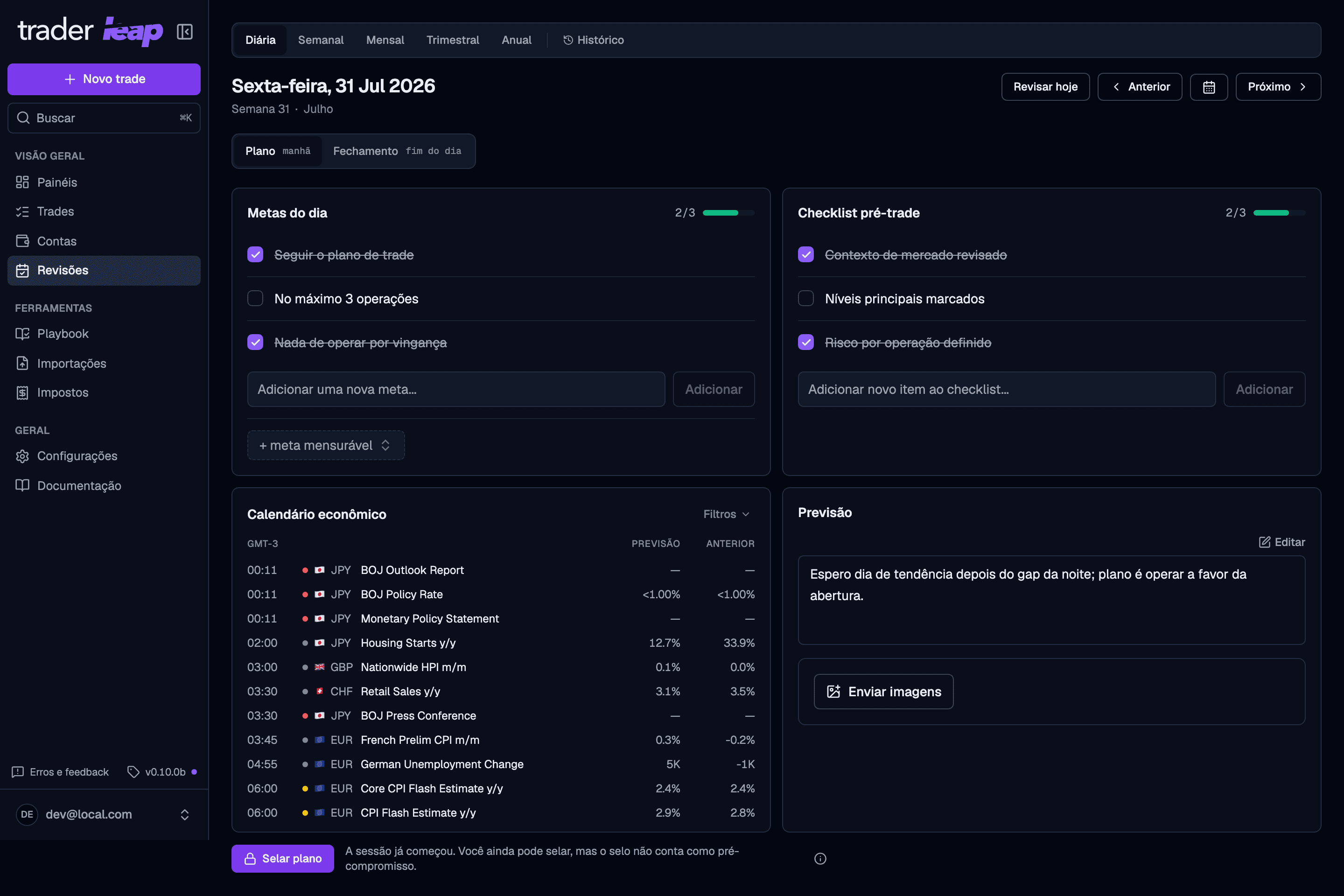
Sealing the plan
Sealing the plan locks in the intention, but not the editing: you can still change the goals or the checklist after sealing. The difference is that the edit is recorded and weighs against your adherence score in the day's Debrief. Checking off a checklist item you had already written doesn't count as an edit; what counts is adding, removing, or rewriting an item after the plan is sealed.
In practice: decide the plan calmly before the session, seal it, and only touch it again if you really have to.
Setups aren't part of what you seal. In the Debrief, a scoreboard grades the setups you actually traded against their Playbook rules, built from the trade reviews you write that day. Following every rule is one of the commitments the adherence score counts.
Reviewing each trade
Everything the Debrief says about your process comes from the trades themselves. Each one gets its own review, written in a drawer that opens from three places: the Review trades button in the trade log, the Review trade button on a trade's page, and the same button above the Debrief's trades table.
For a batch of trades — an import you just finished, or a backlog — the same
review runs as a full-screen pass at /trades/review: a queue down the side,
keyboard stepping, and a data check above each trade that flags a missing
stop, a missing risk amount, a level on the wrong side, or a missing exit,
with the fix right there; when the trade has a single exit, that includes
the exit price itself. The pending-review reminder on your dashboard lands
on it, the trade log marks incomplete records with a dot, and the log's
Review workspace button opens the pass over exactly the trades your
filters show.
The drawer takes one trade at a time, and it opens on one question: did this trade follow the plan? If the answer is yes, one press marks every rule of the trade's setups followed, marks the trade reviewed, saves, and steps to the next one. A review that used to take three minutes takes five seconds on the trades that deserve five seconds.
Everything else lives behind a disclosure that opens by itself only when one press cannot answer (a trade with no setup, or a setup with no rules to affirm):
- The setup and its playbook rules, already marked from the pre-trade check you confirmed when logging the trade. Leave ticked the ones you actually followed. On a trade that arrived without a setup — an import, usually — Trader Leap names the one it looks like and says what it matched on: the instrument, the side, the time of day. It is derived from how you have used that setup before, so it only speaks once a setup has enough history to be recognizable, and it stays quiet when two setups fit equally well. One press classifies the trade; nothing is applied for you.
- Mistakes and tags.
- The thesis, labeled as written during the review: it is an account written after the outcome, not the pre-trade plan.
- The post-loss review on losing trades, if you use that checklist.
- The lesson worth keeping.
- Mark as reviewed, and Save & next to jump to the next trade that still owes the pass.
The queue of pending trades
A trade owes the pass when it is closed, not reviewed, and not dismissed. An open position stays out of the count, since there is no outcome to assess yet. The number beside Review trades is that queue, and every count in the app reads the same rule.
For a backlog you are never going to review, like years of imported history, select the trades in the log and use Dismiss from review. Those trades leave the queue without being presented as reviewed, and Restore to review puts them back. The log's Dismissed filter is where you find them again; filtering by Unreviewed shows the queue itself, so dismissed trades are not in it.
Come back after a while away and the log offers to do the sorting for you: it keeps your last few sessions and your worst losses, and clears the rest in one press. Nothing is deleted, and the trades it clears were never marked reviewed.
Where the setup scoreboard comes from
The Debrief's setup scoreboard stores nothing of its own. It adds up the rule marks from the day's trade reviews, counting only the trades you marked as reviewed, and shows the coverage next to the score: "2 of 5 trades reviewed" changes what "8/10 rules followed" is worth. Until you review at least one of the day's trades, the card asks you to review them instead of showing a number.
What comes ready
- Recurring goals and pre-trade checklist items, set once in Settings and waiting in every new daily and weekly review.
- Measurable targets: max trades in the day, max loss for the day (in money or in R), max loss on a single trade, max risk per trade, how many full stops end your day, and how many consecutive losses do. The Debrief scores each one against what you actually did, and when a day cannot be judged fairly on a target, it says so instead of guessing.
- Images in reviews (Premium) to attach charts and context.
When the Evidence Coach finds that single oversized losses are what costs you, the Plan offers its cap as a max-single-loss target: the number is the coach's own threshold, so accepting means "no more of exactly what was flagged". The target row is marked as coming from your evidence, it scores like any hand-set target, and declining is remembered. A suggestion you cannot decline is a nag, not a suggestion.
The loop that closes
Log the trade, see the pattern in Analytics, and carry the lesson into the next period in your review. Consistency stops being luck and becomes process.
Sealing the plan is the moment of commitment. Treat editing after it as the exception, not the routine.